
See activity beyond managed endpoints
Map hosts, networks, groups and services so an investigation starts with assets your team recognizes, not anonymous addresses.
obserae turns the NetFlow and IPFIX records your infrastructure already exports into named assets, expected connectivity, actionable detections and investigation evidence — without packet capture or a vendor cloud.
Install and start obserae
curl -fsSL https://get.obserae.com | sudo shamd64 / arm64 · systemd service
1Start the container
docker run -d \
  --name obserae \
  --restart unless-stopped \
  -p 2055:2055/udp \
  -p 4739:4739/udp \
  -p 127.0.0.1:8080:8080/tcp \
  -v obserae-data:/var/lib/obserae \
ghcr.io/spartan-conseil/obserae:latest2Get the generated admin password
docker logs obserae 2>&1 \
  | sed -n '/generated admin password/ s/.*password=\([^[:space:]]*\).*/\1/p' \
| tail -n 1Then open http://127.0.0.1:8080 and log in as admin.
Self-hosted · Passive · No telemetry · Free Community edition
Give security and network teams a shared view of who communicated, whether it was expected, and what evidence supports the next decision.
Map hosts, networks, groups and services so an investigation starts with assets your team recognizes, not anonymous addresses.
Describe what should be allowed in the Flow Matrix. Every session can then be matched against the architecture you meant to run.
Unexpected east-west traffic, known-bad destinations, cloud outliers, scans and volume spikes become leads you can review.
Deploy on your own host, keep the data local, export configuration as YAML, and evaluate without a cloud dependency.
Start with questions your firewall, endpoint and log tools often leave disconnected from the actual network conversation.
Sessions are checked against Tor and FireHOL sources so suspicious destinations are visible with source, time and context.
Unexpected east-west sessions stand out when they do not match the connectivity model you defined.
Public destinations are enriched with cloud, country and autonomous-system context so outliers are easier to explain.
Observed traffic proposes networks and hosts that can be added to the cartography instead of staying as shadow infrastructure.
The product surface is built around the daily NDR workflow: understand the network, define what is expected, and investigate what falls outside it.
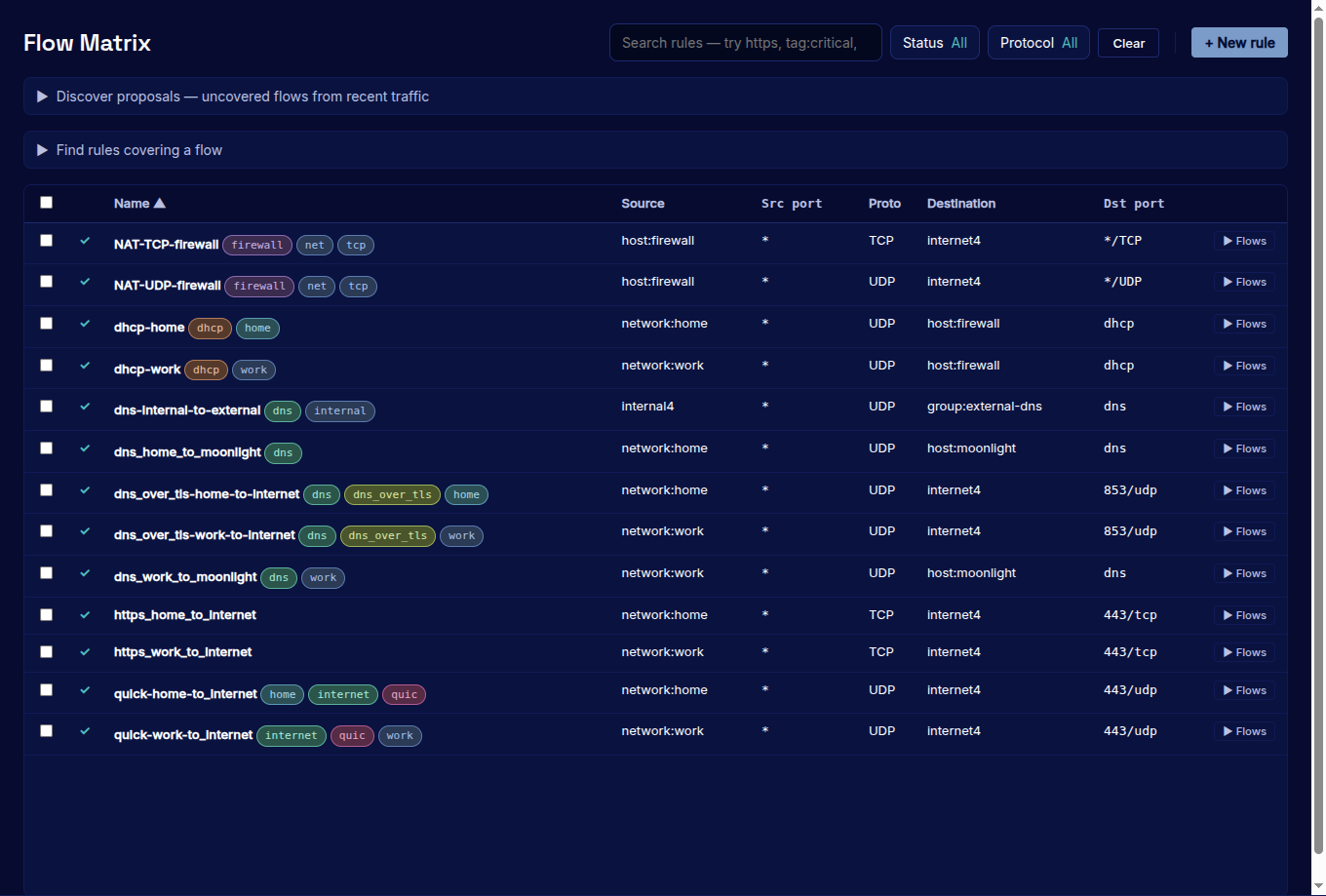
Define the communications your environment is expected to allow. obserae reveals sessions that fall outside that model.
Learn more →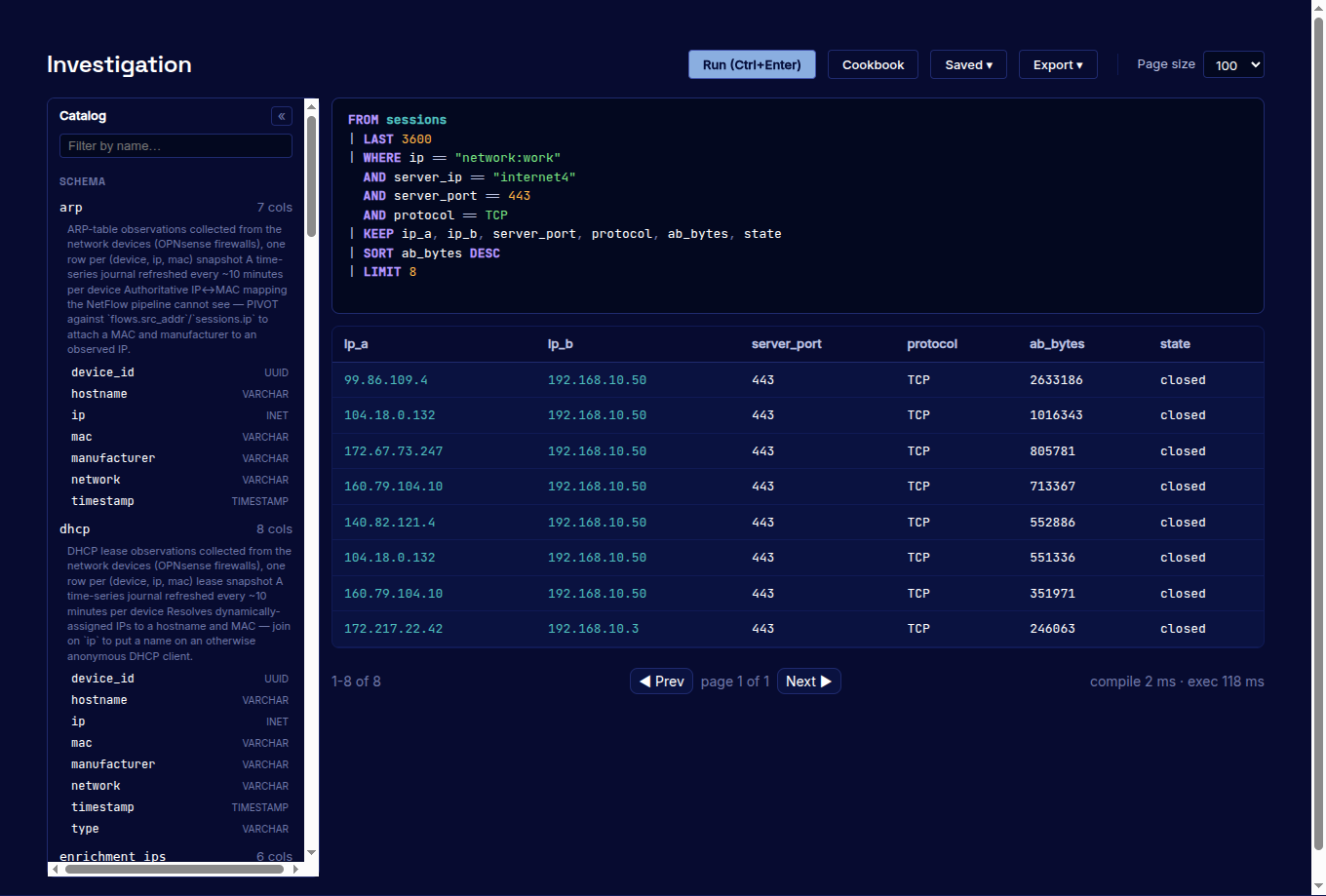
Investigate sessions and flows using names, groups, services, ports, protocols and available enrichment data. Save useful investigations as alerts.
Learn more →Start with one exporter and one network segment. Validate the coverage, operating effort and quality of the evidence before making a broader deployment decision.
Self-hosted, offline-capable, signed releases, SBOM and provenance. The Community edition is free; commercial editions share one feature set and are priced only by organisation size.
Start the Docker image or download a Linux release on amd64 or arm64.
docker run -p 2055:2055/udp -p 4739:4739/udp -p 127.0.0.1:8080:8080/tcp ghcr.io/spartan-conseil/obserae:latestPoint one router, firewall, virtual switch or host probe at UDP 2055/4739.
Name a few networks, key hosts and expected communications, then let discovery fill the gaps.
Use Cartography, Flow Matrix and Investigation to decide whether the signal is normal, misconfigured or suspicious.
The deployment and commercial model are designed to answer the questions a CISO, infrastructure owner or procurement team will ask before a trial.
It stays on infrastructure you operate. There is no vendor cloud, telemetry service or remote access to the instance.
obserae is passive and out of band. An interruption affects visibility, never production connectivity.
Signed artefacts, an SBOM and build provenance can be verified before deployment, including in an isolated environment.
Organisation size — not flow volume, retention, exporters, addresses or a collection of feature add-ons.
Install obserae locally, connect one exporter and decide from evidence collected on your own network.